I ran into a exception yesterday saying "no resource found for key xxx". I double checked my properties file but the key/value was there. Scanning the gwt forum for the same issue resulted in 3 hits but no answer to my problem.
My properties file looked like:
user=User
home=Home
...
Apparently you need to leave spaces between the key, = and value so when i changed the snippet above to
user = User
home = Home
everything worked.
Cheers,
Robby
Showing posts with label GWT. Show all posts
Showing posts with label GWT. Show all posts
Thursday, June 18, 2009

Wednesday, June 17, 2009
Google AppEngine and GWT
I finally started exploring google app engine. I'm planning on giving a knowledge session later this year as part of my goals for this year. I only spent a few days experimenting and with no prior knowledge I'm quite satisfied with my progress. Uptill now i created a new app engine project using JDO for persistence. I hope JPA does not turn out to be a better choice in the end.
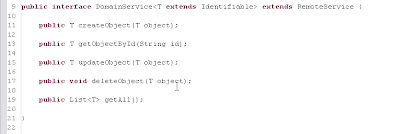
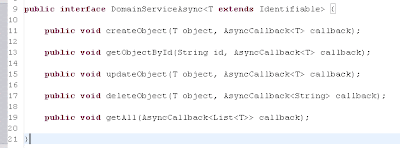
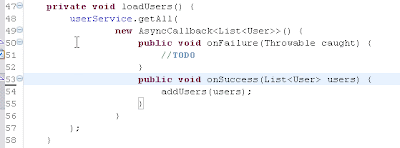
Anyway, i was able to create a userform widget (composite) which enabled me to add a new user and another usersform widget which presented all users. It took me a while to understand how the Async interface worked since the return type can only be 'void'. Luckily a quick look at the AsyncCallback.java reveiled how it all works.
Below some screenshots of how it works:
Another thing which takes getting used to is page navigation with GWT. You only have one html page representing your EntryPoint. So what you basically do is dynamically adding and removing your widgets in the pagecontainer.
Next weeks I will write more about my findings.
Cheers,
Robby
Anyway, i was able to create a userform widget (composite) which enabled me to add a new user and another usersform widget which presented all users. It took me a while to understand how the Async interface worked since the return type can only be 'void'. Luckily a quick look at the AsyncCallback.java reveiled how it all works.
Below some screenshots of how it works:


Another thing which takes getting used to is page navigation with GWT. You only have one html page representing your EntryPoint. So what you basically do is dynamically adding and removing your widgets in the pagecontainer.
Next weeks I will write more about my findings.
Cheers,
Robby
Subscribe to:
Posts (Atom)