I've been making use of JSON a lot lately since it's fast and convenient to make partial updates on your webpage. I wrote me some reusable flowscript to generate the necessary JSON data.
If you put this script inside your flow folder you can easily generate a JSON string.
A sample is listed below.
My relevant sitemap snippets:
jsonlibtest.jx looks like:
The result looks like
Wednesday, October 28, 2009

Tuesday, September 29, 2009
Bespin, an open extensible web-based framework for code editing
I would not like to withold this promising new project from Mozilla labs.
These guys are creating an awesome platform for developer collaboration.. just take a look at following links:
https://bespin.mozilla.com/
http://labs.mozilla.com/bespin/
These guys are creating an awesome platform for developer collaboration.. just take a look at following links:
https://bespin.mozilla.com/
http://labs.mozilla.com/bespin/
Geolocation supported by latest version of browsers

If you installed the latest update of your preferred browser you might see a new small blue button in google maps. This button only appears if your browser supports geolocation. This functionality basically enables the browser to ask it's "location provider" for an approximate location. This location is determined based on
"WIFI access point", "IP-address", "GPS" or a combination.
Of course I updated my browser immediately (Firefox 3.5.3) and did a test. Without GSP available to my browser, it still gives a pretty good estimate of my location (+- few 100 metres).
Thursday, September 17, 2009
Getting the most out of Enums
Below an enum I created for some project...
Shoot and give comments !!
Shoot and give comments !!
public enum DataType{
String(
"java.lang.String",
"String",
Operator.EQUALS,
Operator.CONTAINS,
Operator.IS_EMPTY,
Operator.IS_NULL,
Operator.IN
) {
public Object newInstance(Object value) {
String object = null;
if (value == null) {
return object;
}
try {
object = java.lang.String.valueOf(value.toString());
} catch (Exception e) { }
return object;
}
},
Integer(
"java.lang.Integer",
"Integer",
Operator.EQUALS,
Operator.IS_NULL,
Operator.GT,
Operator.GTE,
Operator.LT,
Operator.LTE,
Operator.BETWEEN
) {
public Object newInstance(Object value) {
Integer object = null;
if (value == null) {
return object;
}
try {
object = java.lang.Integer.valueOf(value.toString());
} catch (Exception e) { }
return object;
}
},
Long(
"java.lang.Long",
"Long"
) {
public Object newInstance(Object value) {
Long object = null;
if (value == null) {
return object;
}
try {
object = java.lang.Long.valueOf(value.toString());
} catch (Exception e) { }
return object;
}
},
Double(
"java.lang.Double",
"Double",
Operator.EQUALS,
Operator.IS_NULL,
Operator.GT,
Operator.GTE,
Operator.LT,
Operator.LTE,
Operator.BETWEEN
) {
public Object newInstance(Object value) {
Double object = null;
if (value == null) {
return object;
}
try {
object = java.lang.Double.valueOf(value.toString());
} catch (Exception e) { }
return object;
}
},
Date(
"java.util.Date",
"Date"
) {
public Object newInstance(Object value) {
Long time = null;
Date object = null;
if (value == null) {
return object;
}
try {
time = java.lang.Long.valueOf(value.toString());
object = new Date(time);
} catch (Exception e) { }
return object;
}
},
Character(
"java.lang.Character",
"Character"
) {
public Object newInstance(Object value) {
Character object = null;
if (value == null) {
return object;
}
try {
String stringvalue = value.toString();
if (stringvalue.length() == 1 ) {
object = new Character(stringvalue.charAt(0));
}
} catch (Exception e) { }
return object;
}
},
BigDecimal(
"java.math.BigDecimal",
"BigDecimal"
) {
public Object newInstance(Object value) {
BigDecimal object = null;
if (value == null) {
return object;
}
try {
Double doubleValue = java.lang.Double.valueOf(value.toString());
object = java.math.BigDecimal.valueOf(doubleValue);
} catch (Exception e) { }
return object;
}
},
Boolean(
"java.lang.Boolean",
"Boolean"
) {
public Object newInstance(Object value) {
Boolean object = null;
if (value == null) {
return object;
}
try {
object = java.lang.Boolean.valueOf(value.toString());
} catch (Exception e) { }
return object;
}
};
private String fullName;
private String shortName;
private ListvalidOperators;
DataType(String fullName, String shortName, Operator...operators) {
this.fullName = fullName;
this.shortName = shortName;
validOperators = new ArrayList();
for (Operator operator : operators) {
validOperators.add(operator);
}
}
public String getFullName() {
return this.fullName;
}
public String getShortName() {
return this.shortName;
}
public ListgetValidOperators() {
return this.validOperators;
}
public abstract Object newInstance(Object value);
public String toString() {
return this.shortName;
}
}
Thursday, June 25, 2009
debugging with maven2 jetty plugin
Here a method I found which works (just for my own record).
Step 1
Go to the Run/External Tools/External Tools ..." menu item on the "Run" menu bar. Select "Program" and click the "New" button. On the "Main" tab, fill in the "Location:" as the full path to your "mvn" executable. For the "Working Directory:" select the workspace that matches your webapp. For "Arguments:" add jetty:run.
Move to the "Environment" tab and click the "New" button to add a new variable named MAVEN_OPTS with the value:
-Xdebug -Xnoagent -Djava.compiler=NONE -Xrunjdwp:transport=dt_socket,address=4000,server=y,suspend=y
If you supply suspend=n instead of suspend=y you can start immediately without running the debugger and launch the debugger at anytime you really wish to debug.
Step 2
Then, pull up the "Run/Debug/Debug ..." menu item and select "Remote Java Application" and click the "New" button. Fill in the dialog by selecting your webapp project for the "Project:" field, and ensure you are using the same port number as you specified in the address= property above.
Now all you need to do is to Run/External Tools and select the name of the maven tool setup you created in step 1 to start the plugin and then Run/Debug and select the name of the debug setup you setup in step2.
From instructions provided by Rolf Strijdhorst on the Maven mailing list
Stopping Jetty
In order to stop the jetty server the "Allow termination of remote VM" should be checked in debug dialog in Step 2. When you have the jetty server running and the debugger connected you can switch to the debug perspective. In the debug view, right click on the Java HotSpot(TM) Client VM[localhost:4000] and chose terminate. This will stop the debugger and the jetty server.
Step 1
Go to the Run/External Tools/External Tools ..." menu item on the "Run" menu bar. Select "Program" and click the "New" button. On the "Main" tab, fill in the "Location:" as the full path to your "mvn" executable. For the "Working Directory:" select the workspace that matches your webapp. For "Arguments:" add jetty:run.
Move to the "Environment" tab and click the "New" button to add a new variable named MAVEN_OPTS with the value:
-Xdebug -Xnoagent -Djava.compiler=NONE -Xrunjdwp:transport=dt_socket,address=4000,server=y,suspend=y
If you supply suspend=n instead of suspend=y you can start immediately without running the debugger and launch the debugger at anytime you really wish to debug.
Step 2
Then, pull up the "Run/Debug/Debug ..." menu item and select "Remote Java Application" and click the "New" button. Fill in the dialog by selecting your webapp project for the "Project:" field, and ensure you are using the same port number as you specified in the address= property above.
Now all you need to do is to Run/External Tools and select the name of the maven tool setup you created in step 1 to start the plugin and then Run/Debug and select the name of the debug setup you setup in step2.
From instructions provided by Rolf Strijdhorst on the Maven mailing list
Stopping Jetty
In order to stop the jetty server the "Allow termination of remote VM" should be checked in debug dialog in Step 2. When you have the jetty server running and the debugger connected you can switch to the debug perspective. In the debug view, right click on the Java HotSpot(TM) Client VM[localhost:4000] and chose terminate. This will stop the debugger and the jetty server.
Wednesday, June 24, 2009
youtubeapp
Today I was listening to music on youtube and I suddenly got the idea to build an app that
would enable users to add a playlist just like Itunes. Guess what...
http://www.youtubeapp.com
It already exists ;-) It really looks web2.0 and since I've installed ORB on my desktop I can open this application through the Wii. So next time I'll be listening my favourite songs on television.
Robby
would enable users to add a playlist just like Itunes. Guess what...
http://www.youtubeapp.com
It already exists ;-) It really looks web2.0 and since I've installed ORB on my desktop I can open this application through the Wii. So next time I'll be listening my favourite songs on television.
Robby
Tuesday, June 23, 2009
Bug in Google Chrome
I was trying to view a xml file in Chrome today after updating to the most recent version and to my surprise it did not render the xml properly like is the case in most other browsers. I hope this bug will be fixed soon.
Thursday, June 18, 2009
Internationalization with GWT
I ran into a exception yesterday saying "no resource found for key xxx". I double checked my properties file but the key/value was there. Scanning the gwt forum for the same issue resulted in 3 hits but no answer to my problem.
My properties file looked like:
user=User
home=Home
...
Apparently you need to leave spaces between the key, = and value so when i changed the snippet above to
user = User
home = Home
everything worked.
Cheers,
Robby
My properties file looked like:
user=User
home=Home
...
Apparently you need to leave spaces between the key, = and value so when i changed the snippet above to
user = User
home = Home
everything worked.
Cheers,
Robby
Wednesday, June 17, 2009
Google AppEngine and GWT
I finally started exploring google app engine. I'm planning on giving a knowledge session later this year as part of my goals for this year. I only spent a few days experimenting and with no prior knowledge I'm quite satisfied with my progress. Uptill now i created a new app engine project using JDO for persistence. I hope JPA does not turn out to be a better choice in the end.
Anyway, i was able to create a userform widget (composite) which enabled me to add a new user and another usersform widget which presented all users. It took me a while to understand how the Async interface worked since the return type can only be 'void'. Luckily a quick look at the AsyncCallback.java reveiled how it all works.
Below some screenshots of how it works:
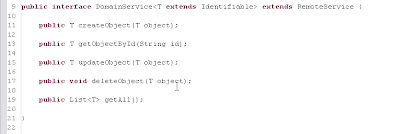
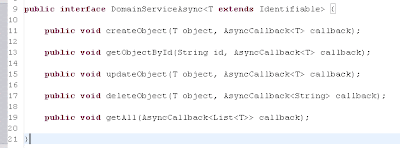
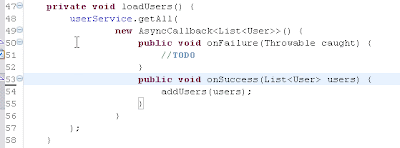
Another thing which takes getting used to is page navigation with GWT. You only have one html page representing your EntryPoint. So what you basically do is dynamically adding and removing your widgets in the pagecontainer.
Next weeks I will write more about my findings.
Cheers,
Robby
Anyway, i was able to create a userform widget (composite) which enabled me to add a new user and another usersform widget which presented all users. It took me a while to understand how the Async interface worked since the return type can only be 'void'. Luckily a quick look at the AsyncCallback.java reveiled how it all works.
Below some screenshots of how it works:


Another thing which takes getting used to is page navigation with GWT. You only have one html page representing your EntryPoint. So what you basically do is dynamically adding and removing your widgets in the pagecontainer.
Next weeks I will write more about my findings.
Cheers,
Robby
Wednesday, June 10, 2009
Video DownloadHelper
Yesterday i installed a really nice plugin for firefox which enables me to download movies from all kinds of websites like Youtube. It also automatically converts the movie into MPEG4. Now if I find a movie worthwile to watch in good quality, i just download it first and can watch it later on. Even without an internet connection ;-)
https://addons.mozilla.org/nl/firefox/addon/3006
https://addons.mozilla.org/nl/firefox/addon/3006
Subscribe to:
Posts (Atom)